Introduction
Large engineering projects rarely develop within a single discipline. Requirements arrive from the client, responsibilities are divided across teams, models and drawings begin to accumulate, technical questions emerge, decisions change previous work, and eventually everything has to be reviewed and presented as one coordinated project.
The planned Linha Rubi connection between Porto and Vila Nova de Gaia, including a new Metro crossing over the Douro, gave us a useful real-world context in which to explore that process. [1][2] The project also involves the bridge and its accesses within the Campo Alegre and Arrábida interfaces, creating a multidisciplinary infrastructure and urban-integration context. [3]
Rather than attempting to reproduce the engineering of the real Ponte D. Antónia Ferreira, we used its publicly documented context as the starting point for a hypothetical exercise:
If a multidisciplinary team received a project like this today, how could they develop it from the initial brief through coordination, review and presentation while keeping the work connected in one project?
For the exercise, we simulated the complete project flow inside Scopture.
The process begins by gathering the project context and converting it into clear requirements and constraints. Responsibilities are then distributed between the participating disciplines. As each team begins working, models, drawings and supporting documents are added to the same project, while technical questions are raised directly against the artifacts they concern.
As the design progresses, those questions become coordination issues. Teams review one another’s work, discuss changes, update technical artifacts and retain the decisions that explain why the project evolved. Finally, the project moves through quality review and is stabilised into a state that can be presented to the client or wider project team.
In this case study, we follow that process by considering four stages:
1) Project definition → 2) Responsibilities → 3) Development and Coordination → 4) Review, QA & presentation
Where the focus is on how the teams and their work remain connected while the project moves forward.
1. Project Definition: Bring the Project Context Together
The first step is to convert the available project information into a structure that the team can actually work from.
In Scopture, the project definition can be assembled directly inside the drawing. The team can create a dedicated document for the project brief, research notes, requirements and assumptions, while external material can be added alongside it as PDFs, links or other supporting references. In this case, the Project Definition document was created directly in Scopture, while the Metro do Porto sustainability report [1], public project information [2] and contextual project documentation [3] were imported to the same canvas as source material. As shown in Figure 1, the result is a single project context where internally created documentation and external references remain visible together before technical work begins.
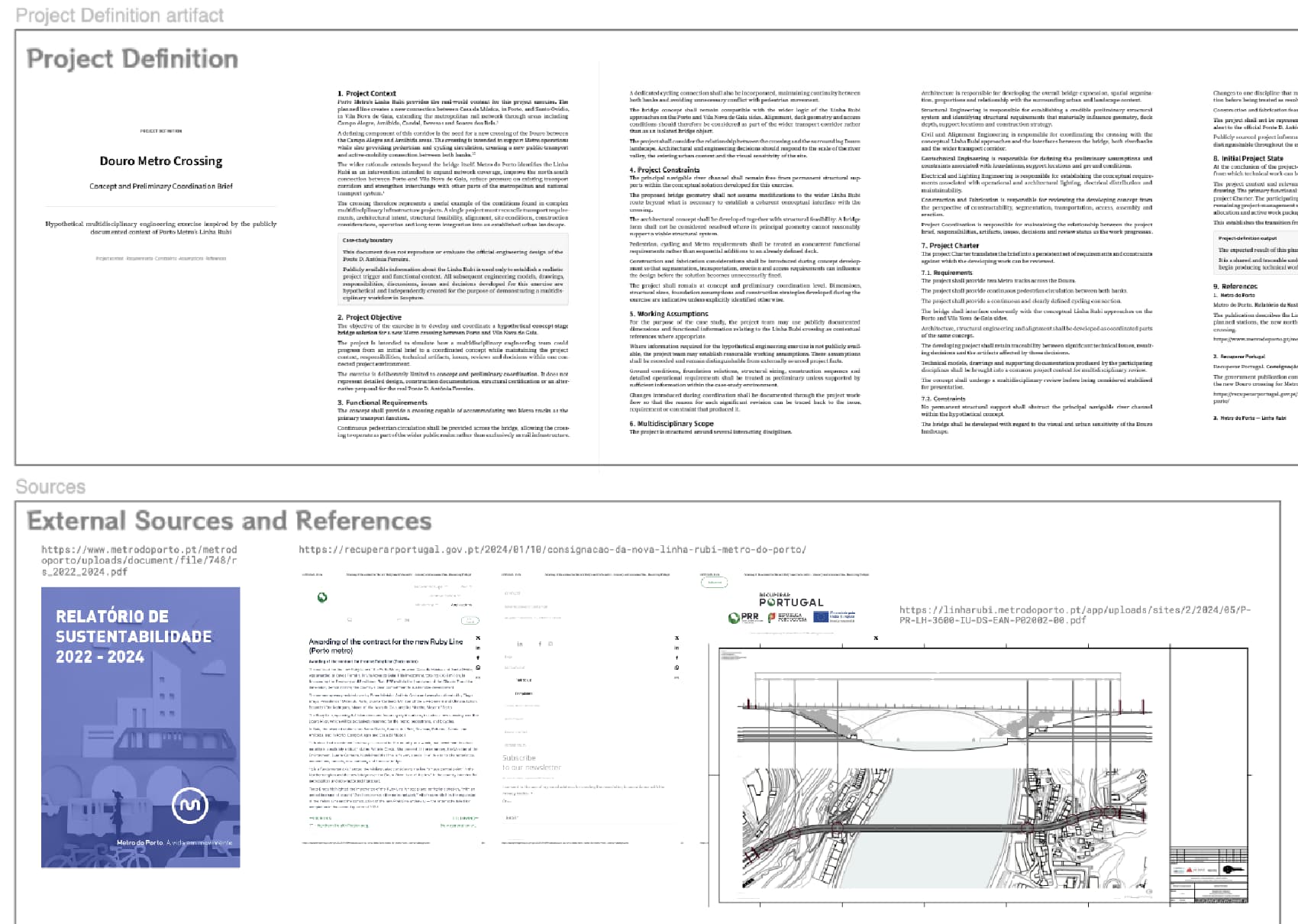
Figure 1 — Project definition in Scopture, combining a document created directly in the drawing with imported PDFs, external references and contextual project sources.
Once the initial context has been gathered, the next step is to translate that information into a clear project baseline. This happens through two linked documents: the Project Definition, which captures the broader scope, assumptions and supporting research, and the Charter, which distils this into the requirements and constraints that must remain visible as the work progresses. In Scopture, this sequence creates a direct link between the information used to understand the project and the conditions later used to guide it:
i) Sources and references → ii) Project Definition → iii) Charter → iv) Shared project baseline
For this case study, the Charter establishes the crossing’s main functional requirements, the limits of the concept-stage exercise, and the constraints that subsequent design decisions must respect. By the end of this phase, the team shares a common understanding of the project before technical work begins. From here, the next step is to assign responsibility, turning that shared definition into active work for each discipline.
2. Responsibility — Turn the Brief into Responsibilities
The next step is to define how responsibility will be distributed across the teams involved.
Scopture does not impose a single responsibility-management method. Teams can continue using the approach that already fits their organization and bring that structure into the project in the format that makes sense for them. This can be done by creating a document directly in Scopture, importing an existing PDF or spreadsheet, or adding another reference file that already contains the responsibility assignments.
For this case study, we used a RACI responsibility matrix created directly inside Scopture. The matrix assigns ownership across the main workstreams and identifies which disciplines are responsible, accountable, consulted or informed for each area of the project. As shown in Figure 2, the result is a single project artifact that makes the responsibility structure visible alongside the rest of the project context.
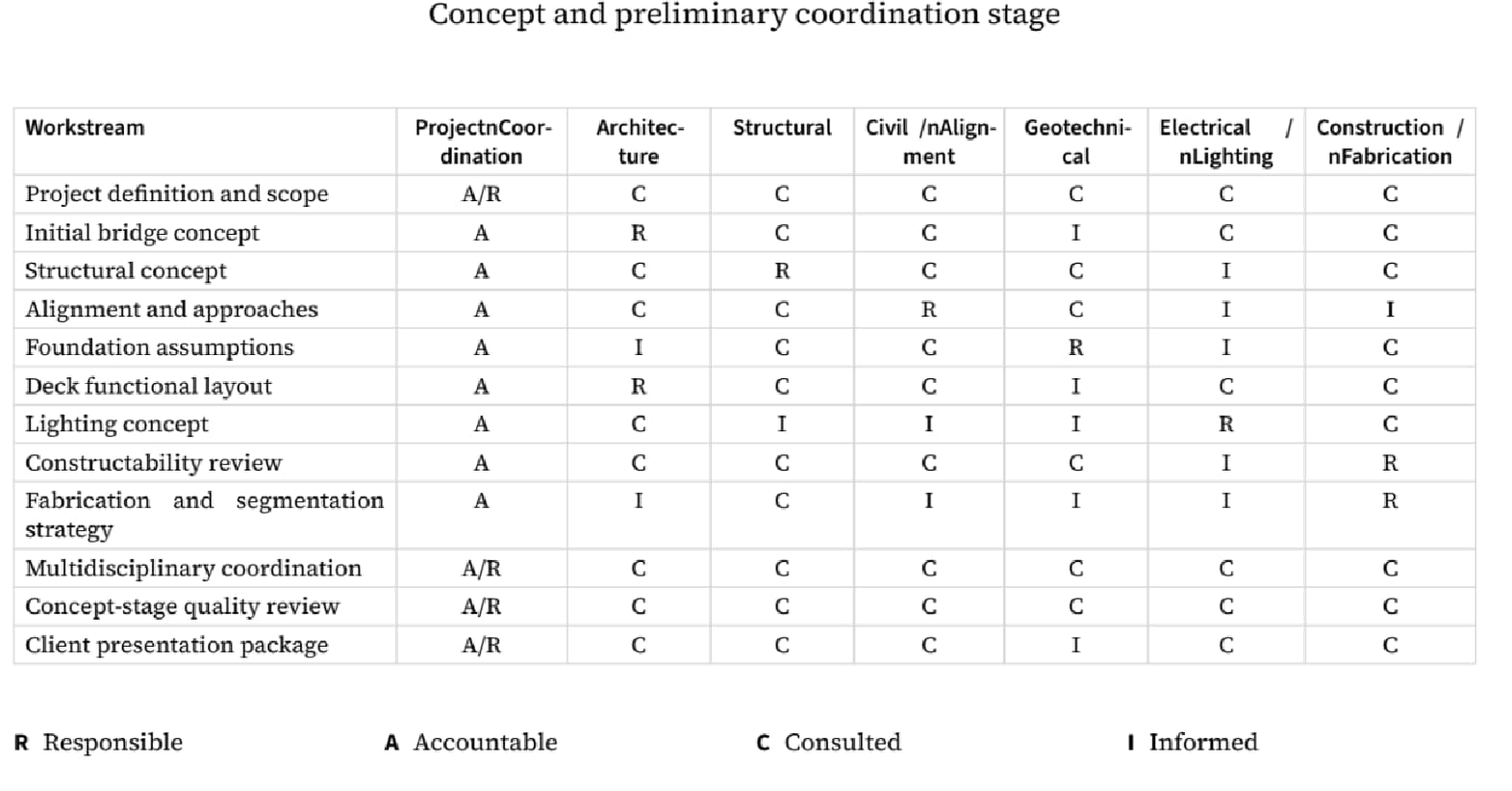
Figure 2 — Responsibility Matrix created directly in Scopture using a RACI structure to define ownership across the main project workstreams and participating disciplines.
Once the responsibility structure has been established, the next step is to bring the participating teams into the project. In Scopture, this can be done seamlessly through a shared project link or by sending an email invitation directly through the application. As shown in Figure 3, this allows the Project Lead to give the relevant disciplines access to the same project context, including the brief, requirements, constraints and responsibility structure already defined.
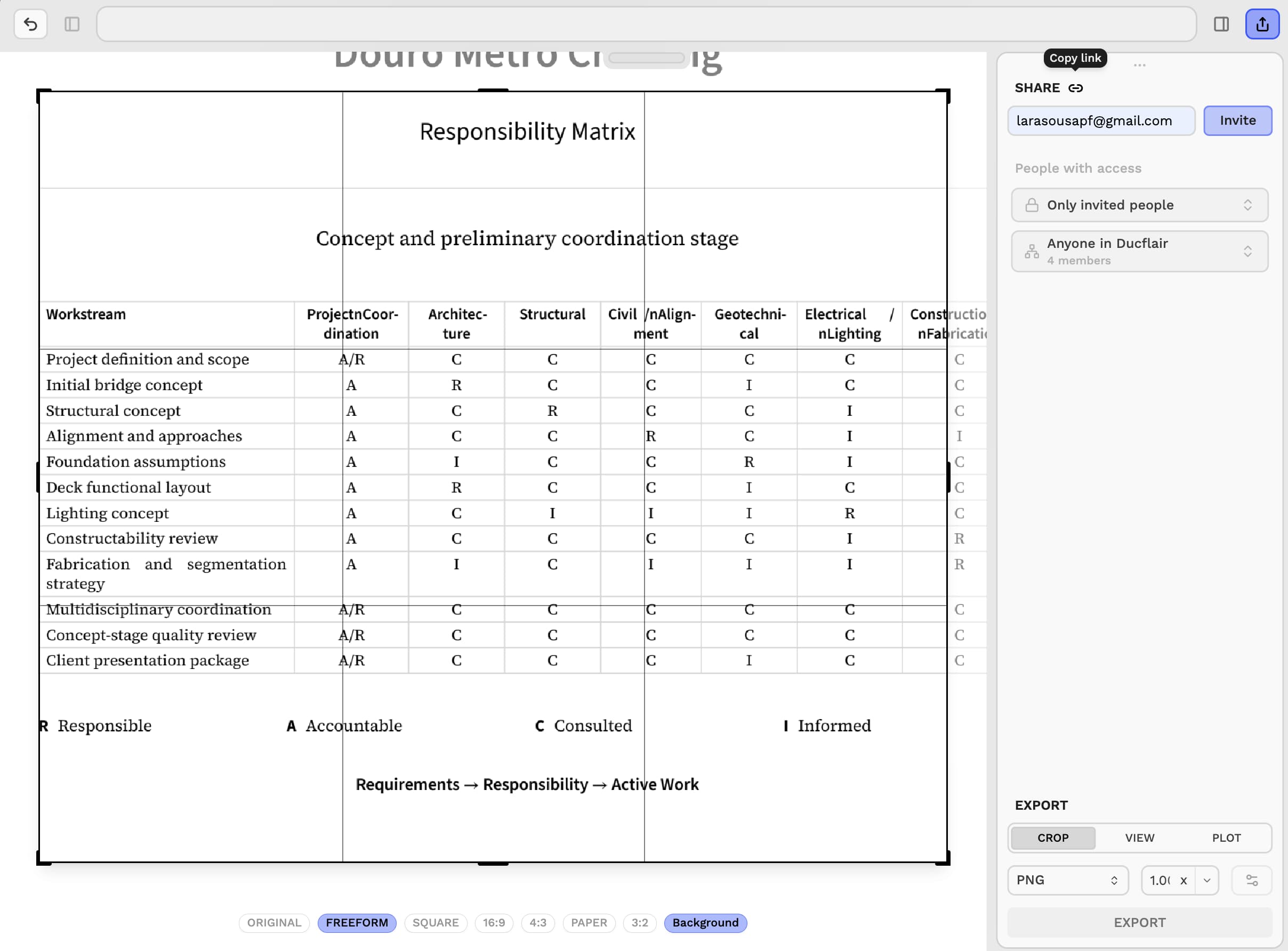
Figure 3 — Project sharing in Scopture, where the Project Lead can invite participating teams through a shared link or direct email invitation so that all disciplines work from the same project context.
From that point onward, each team can begin contributing to the same shared drawing by adding its own models, drawings, documents and supporting references. The project therefore moves from definition and ownership into active multidisciplinary development within one connected environment.
3. Development and Coordination: Letting Each Team Build Within the Same Connected Project
Once the project has been defined, responsibilities have been established and the team has been brought into the shared workspace, the project can move into active development.
At this stage, the role of Scopture is not to replace the discipline-specific tools already used by the participating teams. Architecture, Structural Engineering, Civil and the remaining disciplines can continue producing work in the environments that best suit their needs. Scopture becomes the connected project layer where that work is brought together, made visible in context and coordinated as the project evolves.
The first step in this phase is therefore to begin adding technical artifacts to the project. These may include models, drawings, documents and supporting references produced by different disciplines. As shown in Figure 4, a BIM model can be brought into the shared drawing as part of that process, allowing the project team to review it alongside the rest of the project context rather than in isolation.
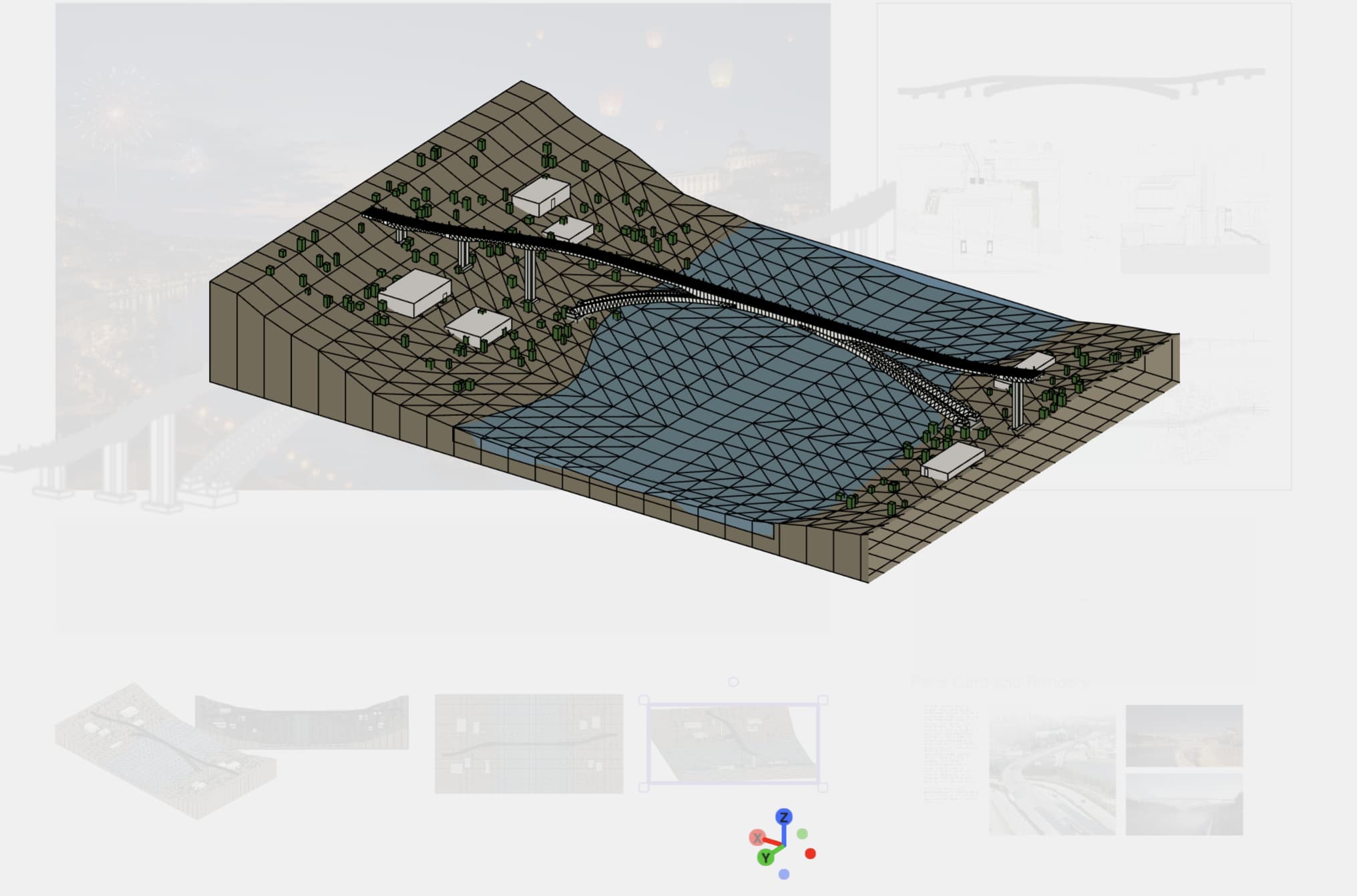
Figure 4 — BIM model added to the Scopture drawing as one example of the technical artifacts that can be brought into the connected project.
As more artifacts are added, coordination gradually becomes part of the work itself. Questions no longer need to remain detached in separate emails, meetings or chat threads. Instead, they can be raised directly against the artifact, location or element they concern. Figure 5 shows this workflow in practice, with an issue pinned to a specific part of the bridge concept. This allows the technical discussion to remain attached to the affected work, making the problem, the responses from other disciplines and the eventual resolution easier to understand in context.
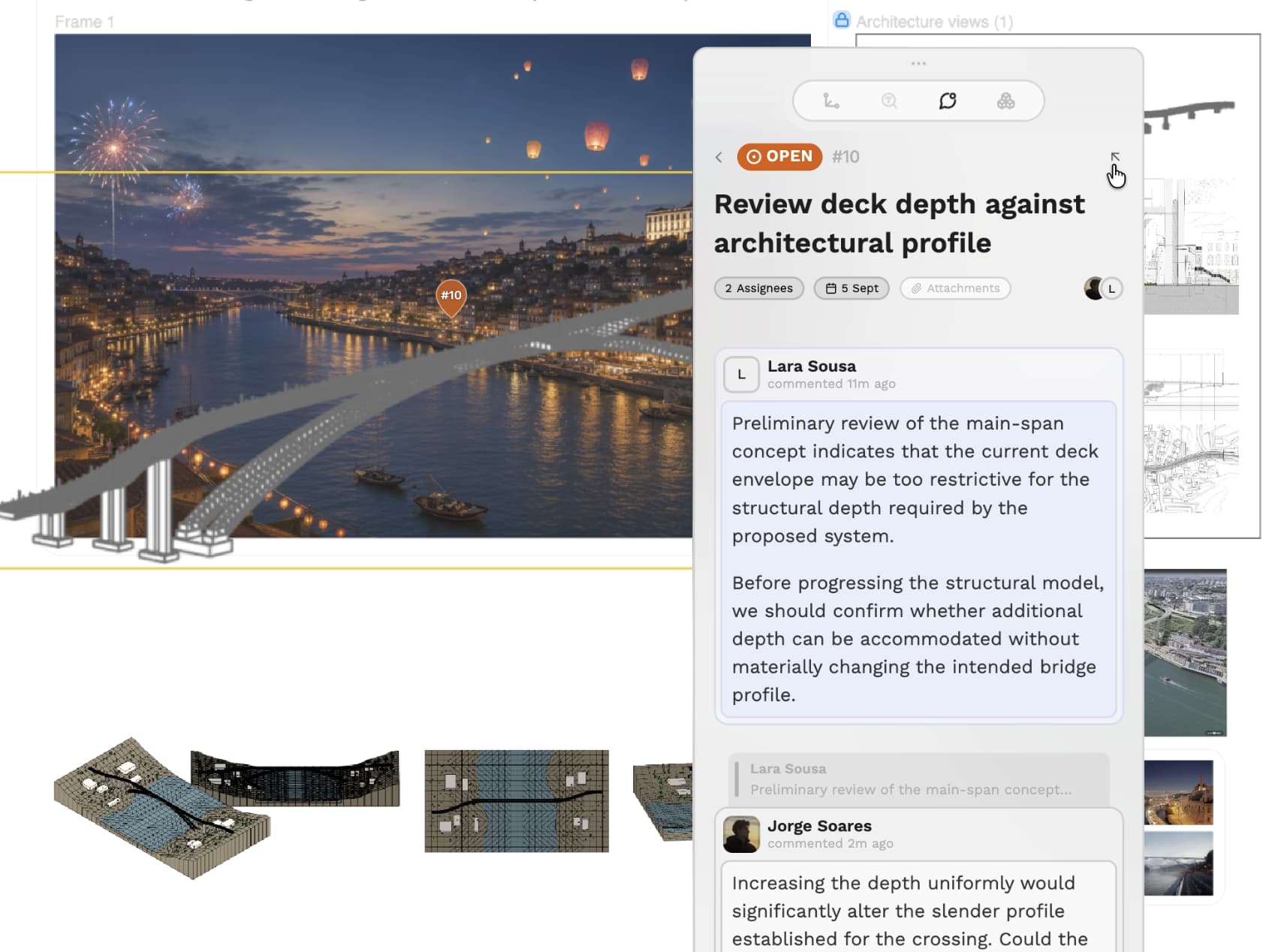
Figure 5 — Issue pinned directly to a specific bridge artifact in Scopture, keeping the technical discussion attached to the work it affects.
This issue-based coordination model is particularly useful once several disciplines begin influencing the same project. A structural concern can affect an architectural profile, a site condition can force a change in support location, and a design revision can require further review from other teams. In each case, the issue becomes the place where the question is raised, the relevant teams respond and the decision behind the resulting change is retained.
As the number of discussions grows, the project also needs a clear way to access and review them over time. Scopture addresses this through the issues view shown in Figure 6, where open, closed and dismissed issues can be reviewed as part of the connected project record. This gives the team a practical way to track what still requires action, what has already been resolved and which discussions were intentionally set aside, while also making the project’s coordination history easier to revisit.
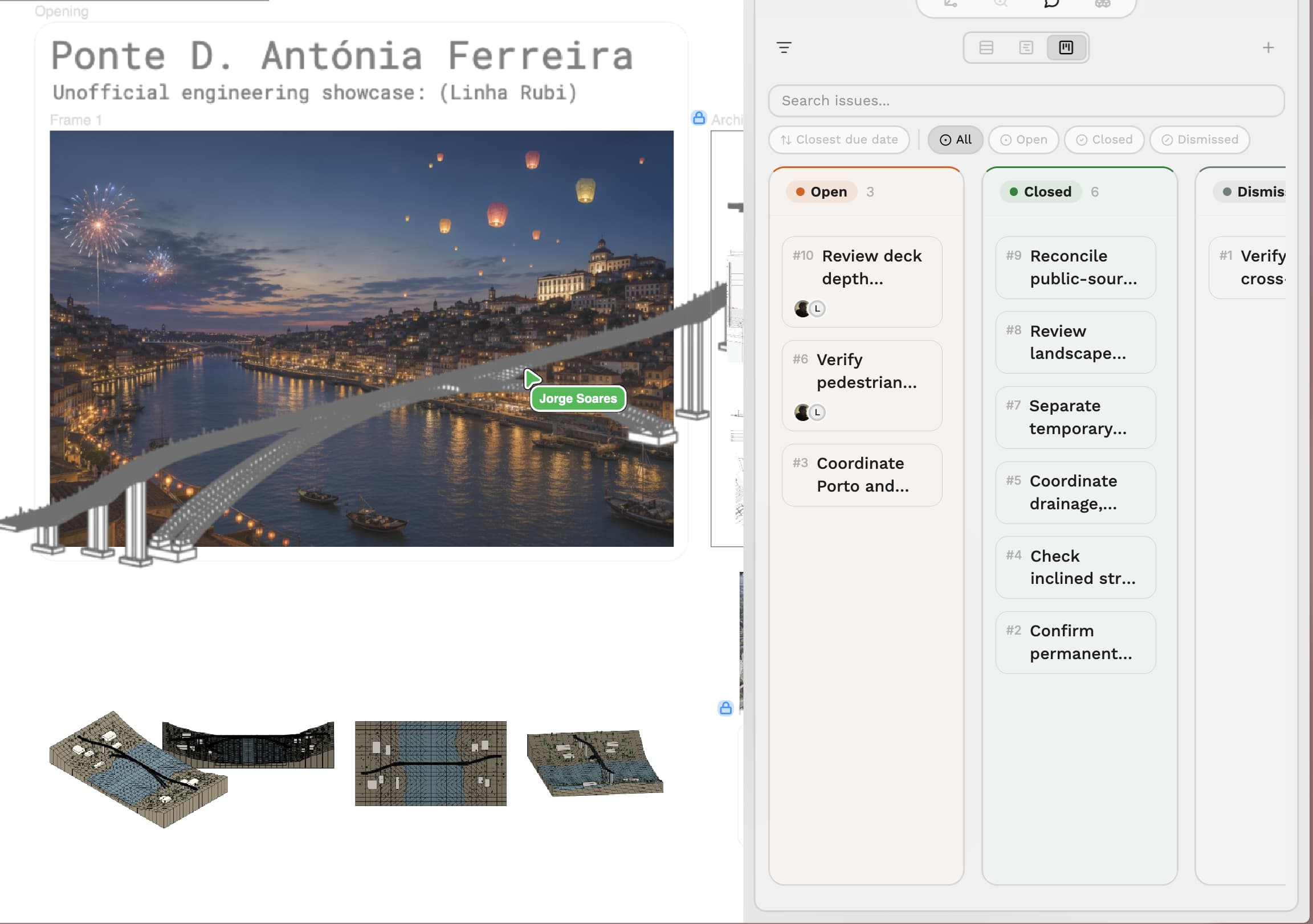
Figure 6 — Issues view in Scopture, showing open, closed and dismissed issues and providing a clear entry point to the project’s coordination history.
The result is a project flow in which technical development and coordination remain connected. Teams contribute their own artifacts, review one another’s work in context and retain the discussions and decisions that explain how the project evolves.
This is the point at which the project becomes more than a collection of files. It becomes a shared and traceable working environment in which multidisciplinary development can progress with the surrounding project context still intact.
4. Review and Presentation: Stabilising the Project for Delivery
As the project approaches a review milestone, the focus shifts from producing new work to confirming that the connected project is ready to be presented.
Scopture’s issue dashboard provides a practical starting point for this review. As shown in Figure 7, open, closed and dismissed issues can be reviewed from a single view, making it easier to identify outstanding coordination work and revisit the discussions that led to previous resolutions. Rather than reconstructing the project status from separate files, emails or meeting notes, the team can review it directly against the project in which the work was developed.
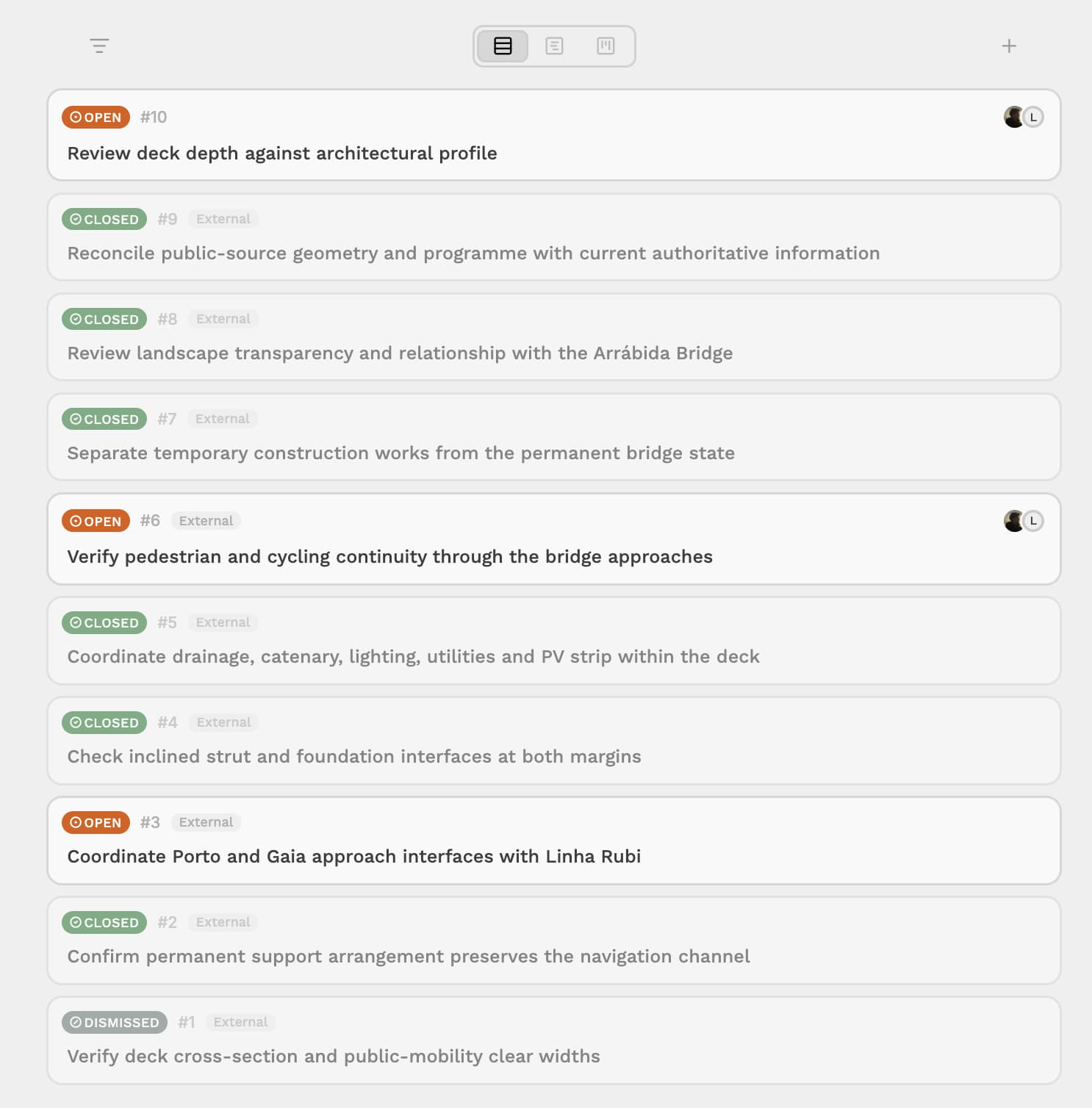
Figure 7 — Project issue dashboard in Scopture, providing an overview of open, closed and dismissed coordination items before the review milestone.
The review can then focus on the remaining open items, consistency between the latest models and drawings, and whether the requirements and constraints established at the beginning of the project have been adequately addressed. Because previous issues and their resolutions remain part of the project record, the current state can still be understood in relation to the decisions that produced it.
Once the project has been stabilised, presentation does not require creating a separate environment. The same connected project can be shared with the relevant reviewers or client through a project link, using the appropriate access level. This allows them to navigate the latest artifacts together with the surrounding project context instead of receiving only an isolated export.
Where a conventional presentation deliverable is still required, such as a PDF review package, it can also be added to the same drawing alongside the models, drawings and supporting material. The presentation therefore becomes another project artifact rather than a separate endpoint disconnected from the work behind it.
One Project, from Beginning to Review
This exercise was not intended to redesign the Ponte D. Antónia Ferreira. The bridge provided a realistic multidisciplinary context in which to explore a broader question: how can engineering teams develop complex work without allowing the project context to fragment as more people, artifacts and decisions become involved?
Scopture provides a connected project layer where those elements can remain together as the work progresses.
Models. Drawings. Issues. Decisions. Reviews. One connected project.
References
[1] Metro do Porto, Sustainability Report 2022–2024. Describes the Linha Rubi as the second north-south Metro axis across the Douro, its route and stations, the expected reduction of congestion around the Arrábida Bridge, connection with CP at Devesas, relief of the Linha Amarela and the role of the new bridge. Metro do Porto Sustainability Report 2022–2024
[2] Recuperar Portugal, “Consignação da nova Linha Rubi (Metro do Porto),” 10 January 2024. Confirms the Casa da Música–Santo Ovídio corridor, eight stations and the new Douro crossing reserved for Metro, pedestrian and bicycle circulation. Recuperar Portugal — Linha Rubi
[3] Metro do Porto, Linha Rubi project documentation. The official execution documentation defines the intervention as the bridge over the Douro and its accesses between Porto and Vila Nova de Gaia, including the Campo Alegre and Arrábida interfaces and associated urban insertion. Official bridge and urban-integration drawing